LC-MS/MS Education Series 3/3 by Waters
Hi, I’m Scott Freeto and I’m a mass spec application specialist here at Waters corporation. In today’s video on analyte tuning, I’m going to walk through the procedure for tuning a Waters standard quadrupole mass spectrometer.
Tuning is a procedure that optimizes or re-optimizes the detection of specific compounds using the mass spec. It may be done at the time of initial method development, or if the performance of the instrument has diminished a bit.
Please be sure to view quadrupole theory and use and quadrupole resolution and mass calibration prior to watching this video. Quadrupole theory and use covers the basic principles of a quadrupole and the various modes of using a tandem quadrupole instrument. This background information will be helpful in understanding why when tuning manually, we will progress through the various MS and MSMS modes of operation.
In our quadrupole resolution and mass calibration video, I discussed the importance of having a good mass calibration and resolution setup on the mass spectrometer before tuning, so that the instrument has a good reference point on which we can tune. It is also worth noting that if you prefer to tune using IntelliStart, which I’ll also cover in this video, a valid calibration and resolution are required.
Because when we tune, we will be infusing our analyte of interest combined with mobile phase. Make sure that your assays mobile phases are on the liquid chromatograph and they have been primed. Also ensure that there is a column in the column manager so that when mobile phase is flowing, there won’t be a leak in your column manager.
Before we get started, make sure that the instrument is in operate, indicated by the green button and operated appearing on the tune page. Also make sure that the atmospheric pressure ionization (API) gas is turned on as indicated by the depressed API button, also on the tune page.
First, we will tune a set of compounds using IntelliStart, and then repeat it with the same compounds manually.
Prepare a mixture of compounds to be tuned. Typically, you’ll need between one and two milliliters of tuning solution with each compound between 101,000 nanograms per mil. This concentration depends upon the sensitivity of the instrument you are using, and how well the compound ionizes. While there is no limit to the number of compounds that can be mixed together in a single tuning solution, I’d suggest not mixing compounds that are within five Dalton’s of each other. Please know the more compounds mixed together, the more complex the resulting spectra will be. I would suggest starting with a compound that is likely to be the most analytically challenging. This might be because the compound in your samples will be at a low concentration or maybe it is known to ionize poorly. Once you identify the compound that is the most challenging, you can set all the tune page parameters to optimize this compound, including parameters such as temperatures and gas flows that cannot be optimized for individual compounds.
Once the tuning mix has been made, attach it to one of the reservoirs on the front of the mass spec. Select the appropriate reservoir to coincide with where the tune mix is located. If you had to change the reservoir designation, the fluidics will purge automatically. If you did not have to change the reservoir designation, press the purge button. You will know that the purge is complete when the status returns to idle. Ensure that the mobile phase is flowing at a flow rate and composition similar to what it will be when the analyte elute from the column. It is not necessary to change the percentage of mobile phases for each compound. Simply estimate an average composition representative of an analyte that elutes in the middle of the chromatogram. Once the tuning mix is purged and the mobile phase flow is established, set the valve position to combined so that the tuning solution and mobile phase will be combined together.
Set the flow rate of the tuning solution to 10 microliters per minute and press the start and fusion button. Double check to make sure that you see a spray coming from the tip of the capillary just above the cone orifice. The mixture I’m using today contains four compounds. They are Caffeine and N-Desmethyl Trimipramine, Alprazolam and D-5 Alprazolam.
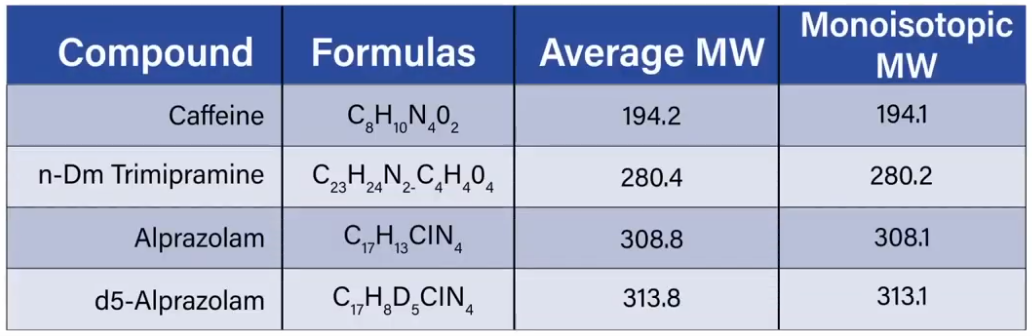 This table shows the name, formula average molecular weight, and monoisotopic molecular weight for each compound. The average molecular weight is the average molecular weight taking into account all the isotopes of the elements that it contains. The monoisotopic molecular weight is the molecular weight of a molecule of this compound with just the most abundant isotope of each element. You'll notice that for compounds, like Caffeine and N-Desmethyl Trimipramine, the monoisotopic molecular weight is only slightly less than the average molecular weight, because the only element with isotopes is carbon, which is mostly carbon 12, and only a small amount of carbon 13.
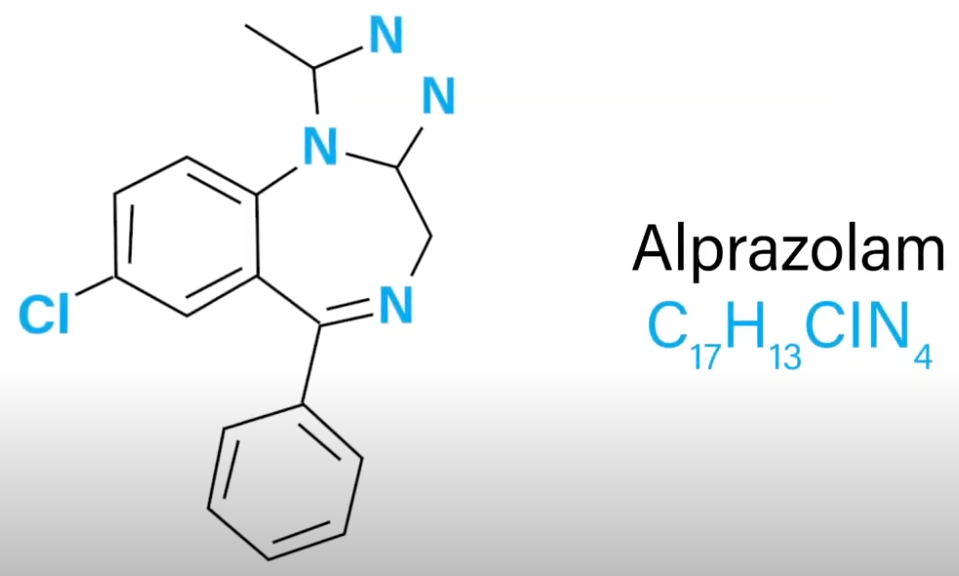 Alprazolam however, contains one chlorine atom, 76% of naturally occurring chlorine has a mass of 35 and 24% has a mass of 37. When you look up the mass of Alprazolam it will usually be given as 308.8. But the mass of the most abundant isotope will be 308.1. This difference of 0.7 Dalton's may be confusing if you're not expecting it.
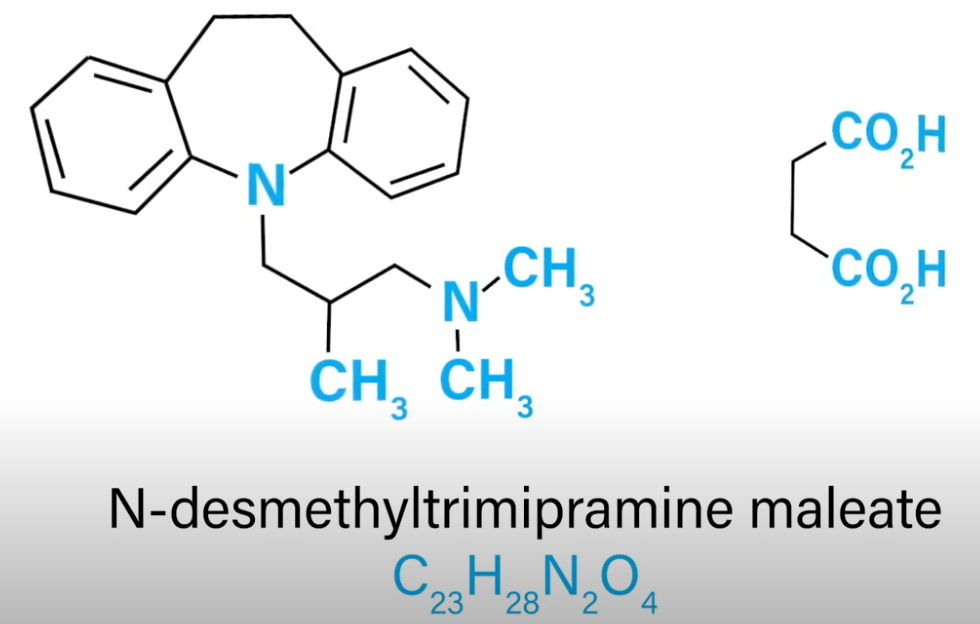
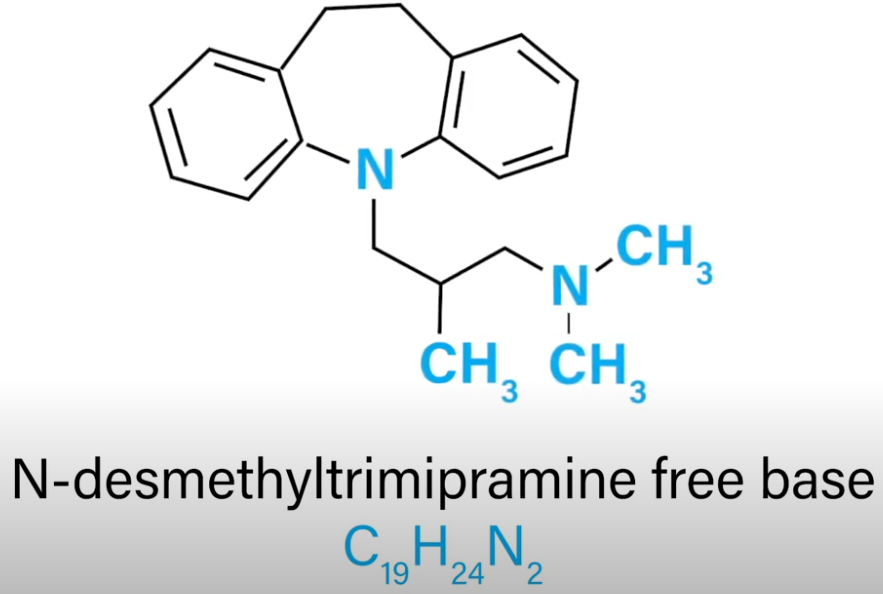 `N-Desmethyl Trimipramine` is another interesting example. As it is usually purchased from chemical supply companies as a salt. In this case, it was purchased as a maleate salt with a formula of C23H28N204 and a total average molecular weight of 396.5. Because when the salt is dissolved it dissociates forming the Free base with a formula of C19H24N2 with an average molecular weight of 280.4. It is this free base form that we are interested in when doing mass spectrometry.
When purchasing other compounds, you will likely purchase hydrochloride or hydrobromide salts as well. These salts are treated the same way when calculating the molecular weight of the compound you expect to analyze. Fortunately, the chemical suppliers almost always packaged the standards, so that the concentration on the bottle is for the free base form. I have selected these compounds due to their varying structures and weights. For demonstration purposes only. You should select the compounds that are applicable to the clinical assay you are planning to perform.
Because deuterated or carbon 13 labeled internal standards are considerably more expensive than their unlabeled counterparts. We really only need to tune the labeled internal standard once. This is because we know the mass of the label standard will be 1 Dalton and heavier than the unlabeled version for each deuterium or carbon 13 Atom incorporated in the molecule. We also know that the cone voltage will be the same for both the labeled and unlabeled version.
Finally, we know that the collision energies used to generate the most abundant fragments in the unlabeled analyte will also produce the most abundant fragments in the labeled compound. What we don’t know at the outset is what the mass of those fragments of the labeled compound will be. Sometimes they will be the same as those of the unlabeled, sometimes they will be heavier. Either way, once we know the fragment that is generated, we know that new lots of the same material from the same vendor will yield the same fragments.
IntelliStart can tune up to four compounds at a time and will generate a report and write the results to the MS method used for data acquisition.
To initiate IntelliStart, select IntelliStart from the mass spec portion of the acuity console. The system tune and develop method checkbox should be checked and then press start.
In the setup parameters dialog box, we can first define the compound details in the top portion of the dialog box. Here we enter the name of the compounds and give IntelliStart an idea what the mass of the analyte is going to be.
We can define this in one of two ways as shown. We can enter the mass of the neutral analyte or enter the molecular formula. Next we define if IntelliStart will be generating a new tune page with newly optimized parameters, or if it should simply use an existing tune page.
Next we define the type of MS method that is to be generated, which is almost always an MRM method. When using a tandem quadrupole instrument. There is a checkbox that can be selected to cause the results of this tuning set to be appended to an existing MS method. This is helpful if you are generating an MS method with many compounds as you can only tune them for at a time. The bottom section of the window allows you to define the range of cone voltages and collision energies that will be scanned. The number of MRM transitions you want to generate for each compound, as well as whether or not the tune solution will be combined with mobile phase during tuning. Once all the options have been defined on this page, simply clicking the Start button will commence the tuning process.
At the completion of IntelliStart tuning, if all compounds were detected and the desired number of fragments was found, then a green tick mark will be displayed.
As we tune manually, we will be using tune tabs on the tune page ESI positive and fluidics will use the fluidics tab to purge the fluidics of the mass spec with our tuning solution. Start and stop the infusion of our analytes as well as define the amount and location of sample to be infused. If requested, a tuning report will be displayed or saved and the MS method will be written or appended as requested. The ESI tab will be used to modify voltages, temperatures and gas flows that optimize the ionization and transmission of our analytes.
Now that the tuning solution has been flowing for a few moments, when displaying the appropriate masses on the tune page, you should see signal for the four compounds. Here you can see that I have four tune page windows open. Each window is displaying a full scan spectrum using the first quadrupole. The set mass for each window is for the protonated M+H monoisotopic mass for each compound. The width of each window is set to 4 Dalton, and the gain of each window is set to show each signal between half and full scale. Because full scan data acquisition is an MS experiment, the button for MS experiments is depressed and the collision gas is off.
If we now switch to the ESI tab, we can see all the user definable voltages, gas flows and temperatures on the instrument. The resolution and ion energy settings should be left at the same values that were set during the resolution setup and mass scale calibration. Otherwise, the other settings on this page can be modified as necessary to give rise to the most intense signal for the most analytically challenging compound.
Once those values are set for that compound, the cone voltage only will be optimized for each subsequent compound. While tuning in MS mode, make note of the mass of the most abundant isotope, and the optimal cone voltage for each compound. You can see that the chlorine containing spectra are a bit different than those that do not contain chlorine. I’ve now closed all the windows, except that for the N-Desmethyl Trimipramine to make the view less confusing. One of the greatest advantages of doing analysis using tandem mass spectrometry is that the technique allows us to measure many compounds at the same time. As we measure many compounds, there are certain parameters that we can change very quickly, and thus be optimized for every analyte. These include the M over Z of the precursor in product ions, the cone voltage that optimizes the entry of the compound into the cone of the mass spec source and the collision energies that optimize the generation of the specific fragments we intend to measure. This leaves many other settings such as temperatures, gas flows, and some voltages that will remain constant during the analysis of all the analytes. Because these other settings may affect the generation and transmission of the analytes. It might be advantageous to optimize these settings for the most analytically challenging compound in the analysis.
This might be the analyte that is expected to be the lowest concentration or the analyte. That doesn’t ionize or fragment particularly well. For this reason I would start tuning with this analyte or if running IntelliStart, I’d run this compound by itself at the outset to develop the tune page settings. After optimizing and recording the cone voltage and precursor mass for each analyte in the mix. Switch the instrument to MSMS mode by turning on the collision gas and depressing the MSMS function button. Looking at one compound at a time, we’ll set the cone voltage to the value that optimize the ionization for that compound. Set the function for the scope to be a daughter ion scan, and then set the mass as the mass of the precursor determined in MS mode. With the mask value set a little higher than half the set value and the span value set to the same as the set value you will see a spectrum usually with just a single ion at the mass of the precursor. As you increase the collision energy, fragment ions will start to appear. You can then zoom in on each of the fragment ions record their mass and optimize and record the collision energy at which the signal is optimize. It is very common to optimize the generation for at least two fragments for each analyte as these multiple fragments will be the basis for monitoring ion ratios as another indicator of peak identification. After all the compounds are tuned in this fashion, the values that were recorded along the way can be entered into an MS method saved and used for data acquisition.
I hope you found this information on analyte tuning to be helpful and informative to review analyte tuning identifies precursor and product masses and sets mass spec parameters to optimize the sensitivity and specificity for that analyte in your resulting assay. Tuning is performed during method development or can be used periodically to re optimize an assay. Tuning can be performed manually or automatically using the IntelliStart routine included in mass links. Having a recent resolution setup and mass calibration are important to have in place before tuning. And lastly, an understanding of how quadruples work, and their modes of operation makes the tuning steps more logical.
I hope you found this video useful. Learn more about waters LCMS solutions in the clinical laboratory at waters.com/clinical.